

Initializing Sentry in an iTwin Studio app
Sentry is a real-time application monitoring and error tracking tool that helps developers identify and resolve issues in their code more efficiently. It captures and reports unhandled exceptions and other runtime problems. By providing detailed context such as stack traces, user actions, environment data, and release versions, Sentry enables teams to quickly diagnose and fix problems before they impact more users.
App specific Sentry configuration
Section titled “App specific Sentry configuration”Apps can create their own Sentry instance by calling StudioHost.initializeSentry(...opts). Currently we send the captured event to both the iTwin Studio client as well as the app-specific client.
// In an app's backend codeconst sentryScope = await StudioHost.initializeSentry({  dsn: "custom-dsn",  environment: "production",  release: `sentry-project-name@${StudioHost.runtimeInfo().startupApp.version}`,  // Any other config});
// The scope can be used for app-specific error trackingsentryScope.setTag("feature", "custom-feature");
App specific Sentry architecture
Section titled “App specific Sentry architecture”iTwin Studio introduces a flexible Sentry client architecture that allows apps to configure their own Sentry clients while maintaining centralized error routing through a root client.
How the architecture works
Section titled “How the architecture works”Error occurs anywhere in codebase ↓Event is routed to root Sentry client ↓Root Sentry client sends event to backend ↓App custom client sends event to its own project-
Root Client Routing: A centralized root Sentry client captures all errors across the application and acts as the routing hub.
-
Backend Relay: The root client forwards events to the backend service, which then distributes them to the appropriate app-specific Sentry projects.
-
Envelope-Based Communication: Instead of sending complex event objects over IPC, the system intercepts and forwards Sentry envelopes - lightweight packets containing only the data Sentry actually sends to servers.
Architectural Diagram
Section titled “Architectural Diagram”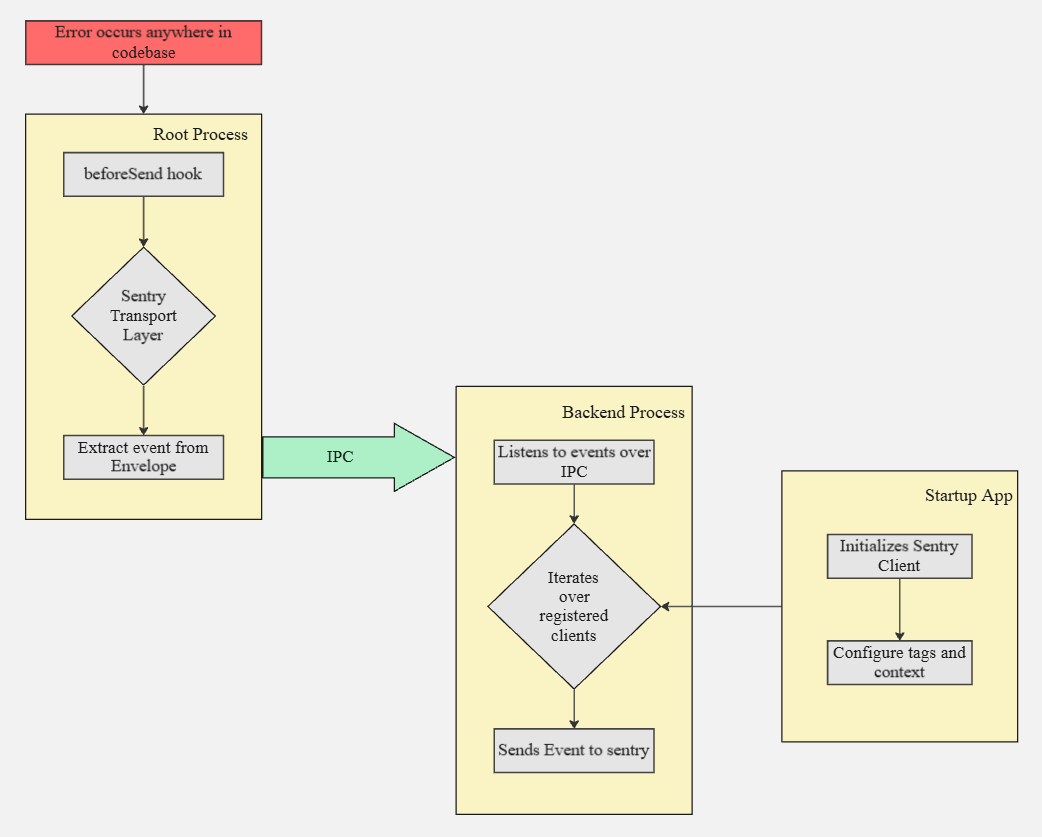
Sentry for all flavors
Section titled “Sentry for all flavors”By default, iTwin Studio does not initialize Sentry when in developer mode.
Sentry in iTwin Studio can be force-enabled by setting STUDIO_FORCE_ENABLE_SENTRY="1". This will bypass any existing conditions and initialize Sentry regardless of other configuration settings.
Design Decisions
Section titled “Design Decisions”Why Envelope Interception vs beforeSend Hook?
Section titled “Why Envelope Interception vs beforeSend Hook?”beforeSendevents contain complex objects (functions, deep nested objects with functions) that cannot be serialized over IPC.- Envelopes are small, serializable packets containing only the essential data Sentry sends to servers.
- This approach avoids serialization issues while maintaining full event fidelity.
Why Not Centralize Client in Root?
Section titled “Why Not Centralize Client in Root?”- Apps need full control over Sentry initialization with complex configurations.
- Different apps may require different tags, contexts, integrations, or project settings.
- This architecture preserves app autonomy while enabling centralized error management.