

Troubleshooting common problems
Getting TypeError: Class extends value undefined is not a constructor or null after upgrading iTwin Studio
Section titled “Getting TypeError: Class extends value undefined is not a constructor or null after upgrading iTwin Studio”Somewhere in your app’s bundle, you are extending a class that is no longer exported from a dependency (or, more likely one of your dependencies is extending a class that is no longer exported from its dependencies). This can happen if you were using a class that was marked as internal, beta, or alpha. The solution is to upgrade all hoisted dependencies and all first-level dependencies that use hoisted dependencies to the latest versions.
Visual Studio Code cannot connect to the target
Section titled “Visual Studio Code cannot connect to the target”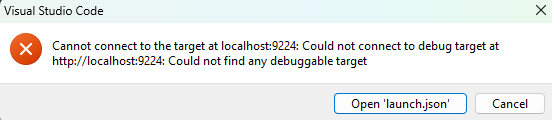
This happens when VS Code is unable to find the exposed port. First, make sure the port specified in the “Attach to iTwin Studio Frontend” configuration is the same as the port specified as --remote-debugging-port in the “Launch iTwin Studio” launch configuration. If they are the same port number, try adding or increasing the timeout on the “Attach to iTwin Studio Frontend” and “Attach to iTwin Studio Backend” configurations. The default is 10 seconds but that may not be enough.
{ "name": "Launch iTwin Studio", // ..., "args": [ // ... "--remote-debugging-port=9222", ], "env": { "STUDIO_UTILITY_EXTRA_CLI_ARGS": "--inspect-brk=9232" } } { "name": "Attach to iTwin Studio Backend", "type": "node", "request": "attach", "port": 9232, "timeout": 30000, // ...},{ "type": "chrome", "request": "attach", "name": "Attach to iTwin Studio Frontend", "port": 9222, "timeout": 30000, // ...},Visual Studio Code address already in use
Section titled “Visual Studio Code address already in use”You can only run one “default” instance iTwinStudio in developer mode at a time. If the socket cannot connect, there is probably another instance of iTwinStudio running in the background. Search your active programs, manually kill any instances, and try again. If you want to debug two different apps at the same time, special configuration is required.
DB is Busy
Section titled “DB is Busy”An iModelConnection was not properly closed. Ensure that you are doing cleanup in the deactivateFrontend and deactivateBackend functions. E.g.,
export async function deactivateFrontend() { const connection = UiFramework.getIModelConnection(); if (connection) await StudioStartupApp.closeConnection(connection);}