

Sandbox
The StudioStartupHost Sandbox API lets you execute arbitrary JavaScript in a hidden Electron renderer with no network, filesystem, or Node.js access. You can optionally expose backend functions to the sandboxed code through a typed api object.
Quick start
Section titled “Quick start”The sandbox is available on StudioStartupHost and is optional, so always guard access:
import { StudioStartupHost } from "@bentley/studio-startup-apps-backend-api";
if (!StudioStartupHost.createSandbox)  throw new Error("Sandbox execution is not available");
const sandbox = await StudioStartupHost.createSandbox();try {  const result = await sandbox.execute("return 2 + 2"); // 4} finally {  sandbox.exit(); // Always clean up}
Exposing backend functions to the sandbox
Section titled “Exposing backend functions to the sandbox”Pass an api object of functions when creating the sandbox. These become available as api.* inside executed code:
const sandbox = await StudioStartupHost.createSandbox({  api: {    add: async (a: number, b: number) => a + b,    greet: async (name: string) => `Hello, ${name}!`,    runtimeInfo: async () => StudioHost.runtimeInfo(),  },});
const sum = await sandbox.execute("return await api.add(10, 5)"); // 15const msg = await sandbox.execute("return await api.greet('World')"); // "Hello, World!"Error handling
Section titled “Error handling”Errors thrown inside the sandbox propagate back to the caller with their message and stack trace:
try { await sandbox.execute("throw new Error('something broke')");} catch (err) { // err.message === "something broke"}Errors in API methods also propagate back into the sandbox code, and then back to the caller if uncaught:
const sandbox = await StudioStartupHost.createSandbox({ api: { fail: async () => { throw new Error("API method failed"); }, },});// This rejects with "API method failed"await sandbox.execute("return await api.fail()");Errors do not kill the sandbox — you can continue executing after failures:
await sandbox.execute("throw new Error('first')").catch(() => {});await sandbox.execute("throw new Error('second')").catch(() => {});const result = await sandbox.execute("return 42"); // still works → 42Timeouts and cancellation
Section titled “Timeouts and cancellation”Execution defaults to a 30-second timeout. Override it or use an AbortSignal:
// Custom timeouttry {  await sandbox.execute("return longRunning()", { timeoutMs: 5000 });} catch (err) {  if (err instanceof Error && err.name === "TimedOutErr") {    // timeout destroys the sandbox  } else {    throw err;  }}
// Abort signalconst controller = new AbortController();setTimeout(() => controller.abort(), 1000);try { await sandbox.execute("return new Promise(() => {})", { signal: controller.signal, });} catch (err) { if (err instanceof Error && err.name === "AbortError") { // abort destroys the sandbox } else { throw err; }}Architecture
Section titled “Architecture”A sandbox involves several Electron processes:
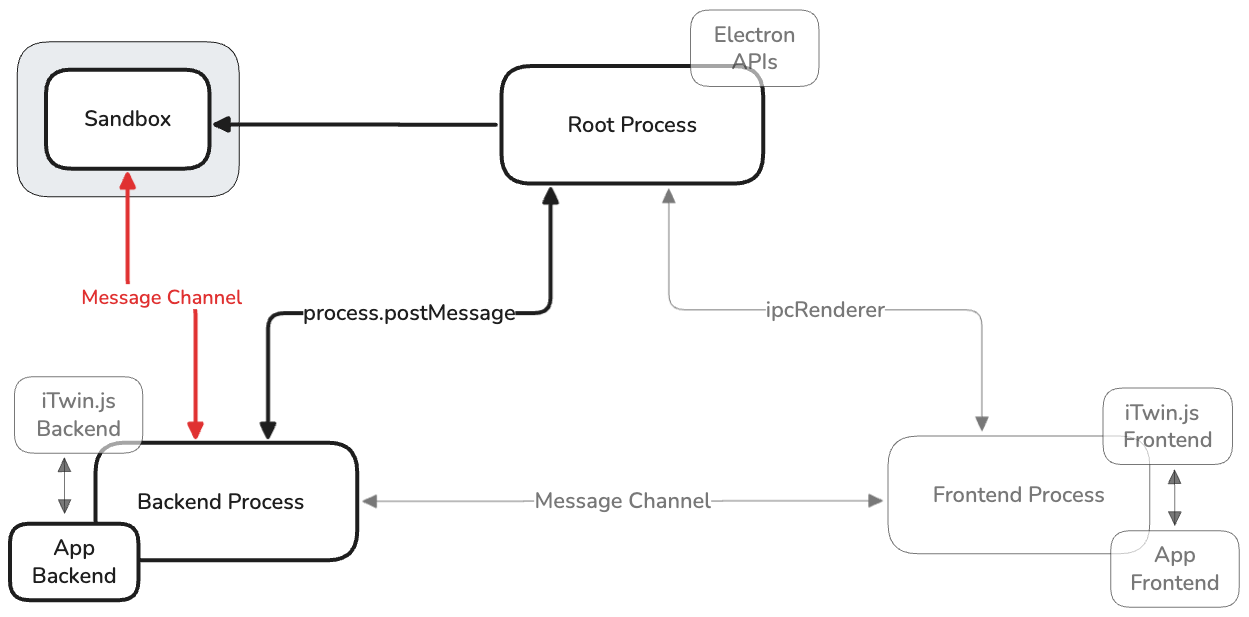
Root process is the orchestrator
Section titled “Root process is the orchestrator”The root process manages sandbox lifecycle:
- Creation: When the backend calls
createSandbox()via IPC, root process creates the sandbox. - Port handoff: Root process creates a
MessageChannelMainpair and sends one into the sandbox window, and forwards the other to the backend process. - Teardown: When the backend calls
exitSandbox(id), root closes the sandbox.
Backend ↔ sandbox communication
Section titled “Backend ↔ sandbox communication”The backend and sandbox preload communicate directly using the MessageChannelMain pair.
Backend → Sandbox:
api-init— sends list of API method names the sandbox can callexecute— sends JavaScript code string to runapi-result/api-error— returns results of API calls the sandbox made
Sandbox → Backend:
ready— confirms API was initializedresult/error— returns execution resultsapi-call— invokes a backend-provided API method
Security
Section titled “Security”Isolation layers
Section titled “Isolation layers”The sandbox applies multiple isolation layers:
- Chromium sandbox —
sandbox: trueenables the OS-level Chromium sandbox - No Node.js —
nodeIntegration: falsewithcontextIsolation: true - Network blocking — session-level request filter cancels all non-
data:URIs - Content Security Policy —
default-src 'none'; base-uri 'none'; form-action 'none'; navigate-to 'none'blocks inline scripts,eval, external<script>tags, all asset loading,<iframes>, etc. - Window —
devTools: false,disableDialogs: true,window.opendenied
Attack surface
Section titled “Attack surface”Practically the only attack surface is the API functions exposed via options.api, since those run in the privileged backend process with whatever arguments the sandbox sends.
- Validate arguments — the sandbox can send any structured-clone-serializable value (
ArrayBuffer,RegExp,Map, nested objects), not just JSON primitives. Validate alldata.argsbefore using them. - Limit scope — expose only the minimum set of functions the sandbox needs.